Quick Answer: What can AI chatbots automate for businesses?
An AI chatbot for business can automate repetitive customer-facing and sales-related tasks such as answering FAQs, capturing lead enquiries, qualifying prospects, booking appointments, providing personalized recommendations, collecting structured information, and connecting conversations seamlessly with CRM systems. By handling the routine workflow, AI frees up human employees to focus on complex problem-solving and high-value sales conversations.
Introduction
Businesses often think of chatbots as basic tools that simply answer FAQs or provide links to help articles. While that was true a few years ago, modern conversational AI has evolved dramatically.
Today, an intelligent assistant can answer complex questions, recommend specific products or services, qualify incoming enquiries, book appointments on a calendar, route sensitive conversations to the right department, and trigger data updates in business software.
As McKinsey highlights, applied AI in customer service and sales is rapidly becoming a standard expectation rather than a novelty. The important question is no longer: "Should my business use a chatbot?" Instead, leaders must ask: "Which specific business processes should my chatbot handle?"
What Is an AI Chatbot for Business?
Unlike a traditional rule-based chatbot (which forces users to click a rigid set of pre-programmed buttons), a modern business AI chatbot uses Natural Language Processing (NLP) and Large Language Models (LLMs) to understand open-ended questions.
However, unlike general-purpose AI assistants (like the public version of ChatGPT), a business chatbot is strictly confined to your company’s proprietary data and rules. It exists on your website or app for a very specific purpose: to guide users towards a business outcome.
What Can an AI Chatbot Actually Automate?
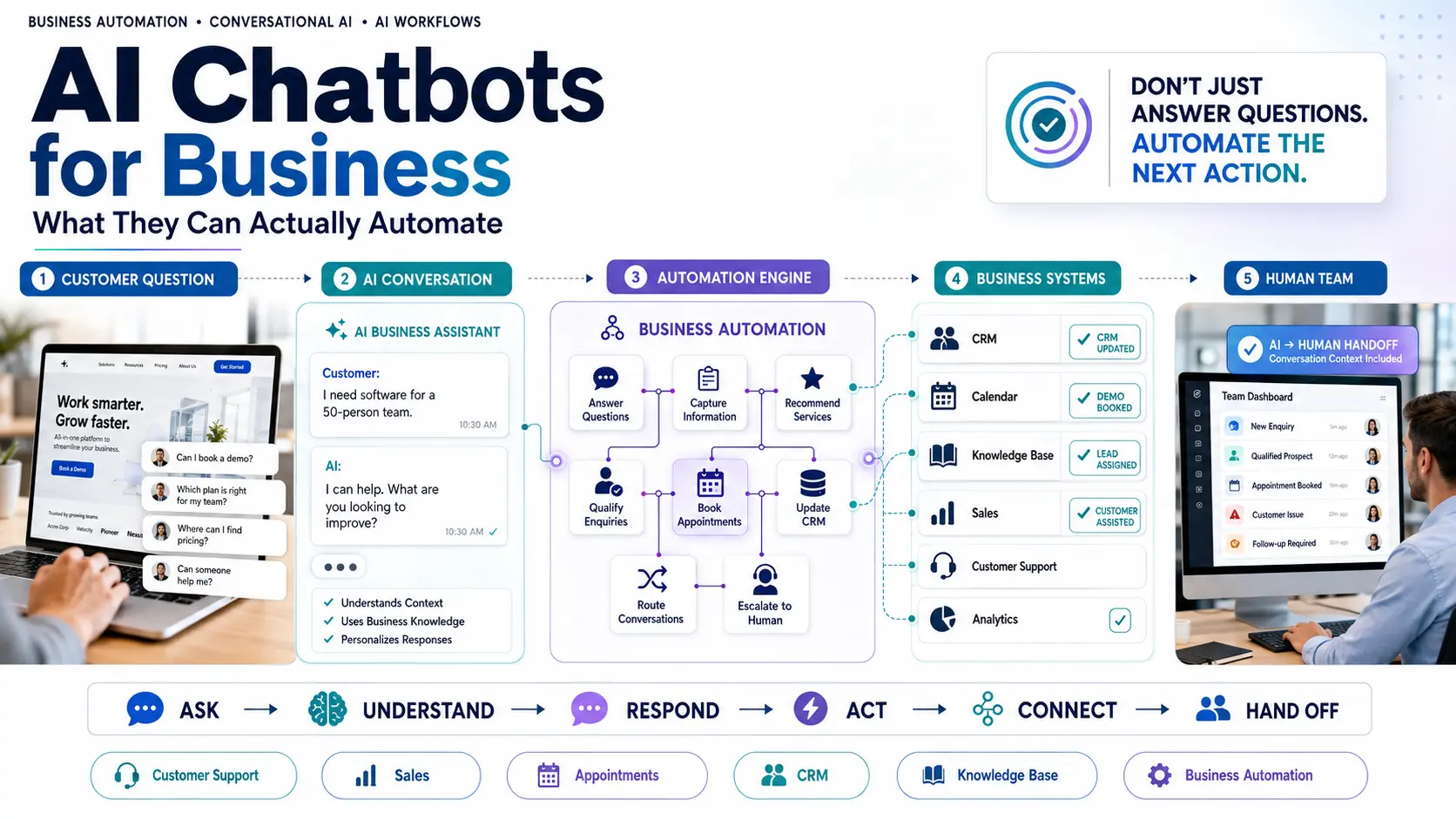
Automation works best when it tackles repetitive tasks while preserving the human touch for complex exceptions. Here is a high-level view of the workflows AI can handle:
| Business Task | What AI Can Do (Automated) | Human Involvement (Escalated) |
|---|---|---|
| FAQs | Answer common questions instantly 24/7 | When questions fall outside known data |
| Lead Enquiries | Capture contact information natively | Sales follow-up and closing |
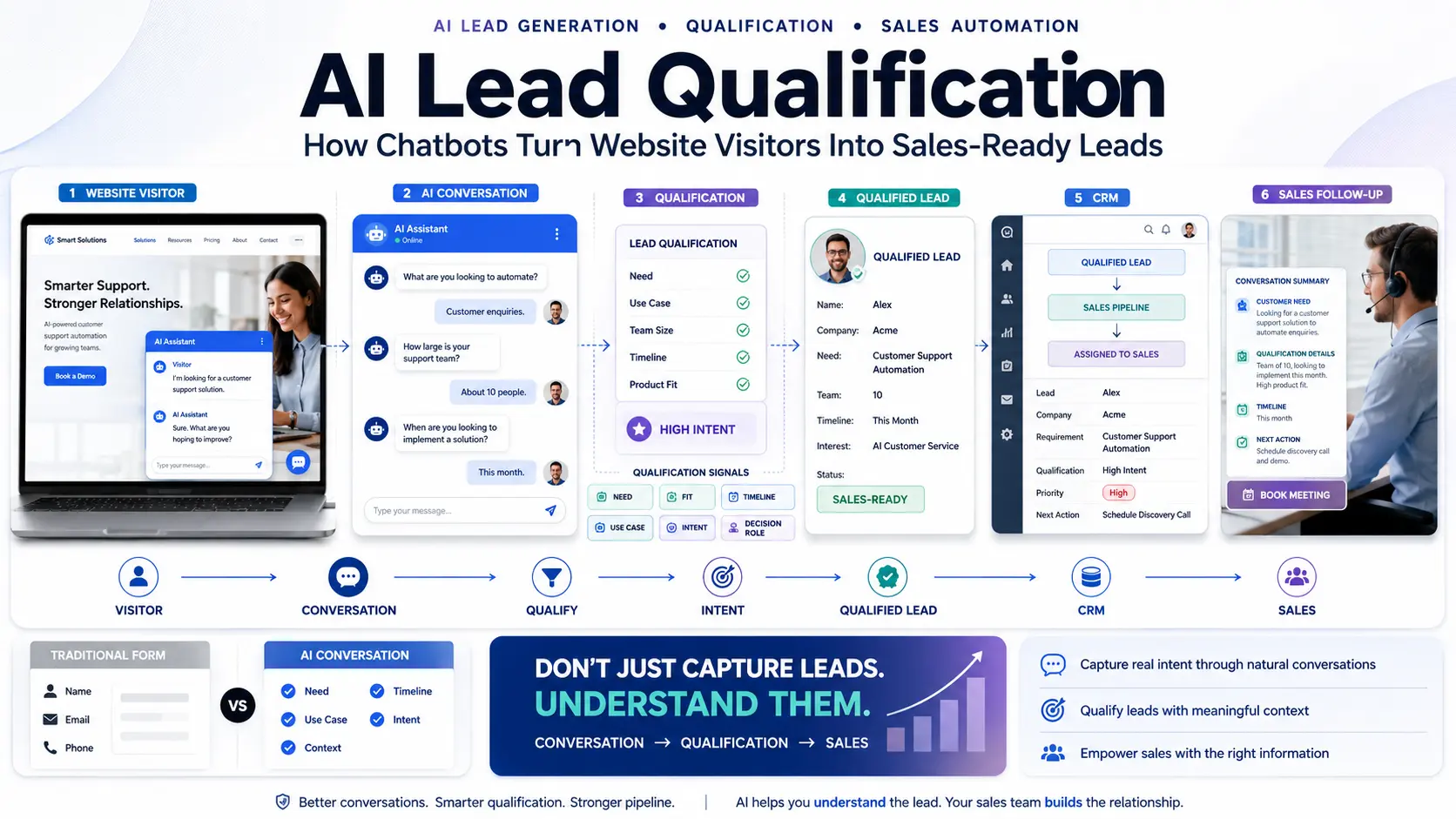
| Qualification | Ask relevant questions to assess intent | Intervening on high-value enterprise leads |
| Appointments | Schedule meetings directly on a calendar | Conducting the actual consultation |
| Product Discovery | Recommend options based on user inputs | Complex or custom configuration decisions |
| Customer Support | Resolve basic issues (e.g., policy queries) | Escalation of angry users or severe bugs |
| Information Requests | Retrieve documents, PDFs, or order statuses | Handling exceptions not in the system |
| CRM Updates | Send conversation data seamlessly via integration | Sales management and pipeline review |
1. Automate Customer Questions
The most immediate ROI comes from automating repetitive queries. By ingesting your website, PDFs, and past support logs, an AI chatbot can instantly answer questions regarding:
- Pricing and plans
- Product features and integrations
- Business hours and locations
- Services offered
- Return and refund policies
- Delivery information
- Eligibility requirements
Answering these queries instantly reduces the repetitive workload on your team and prevents visitors from bouncing to a competitor because they couldn't find a piece of information.
2. Automate Lead Enquiries
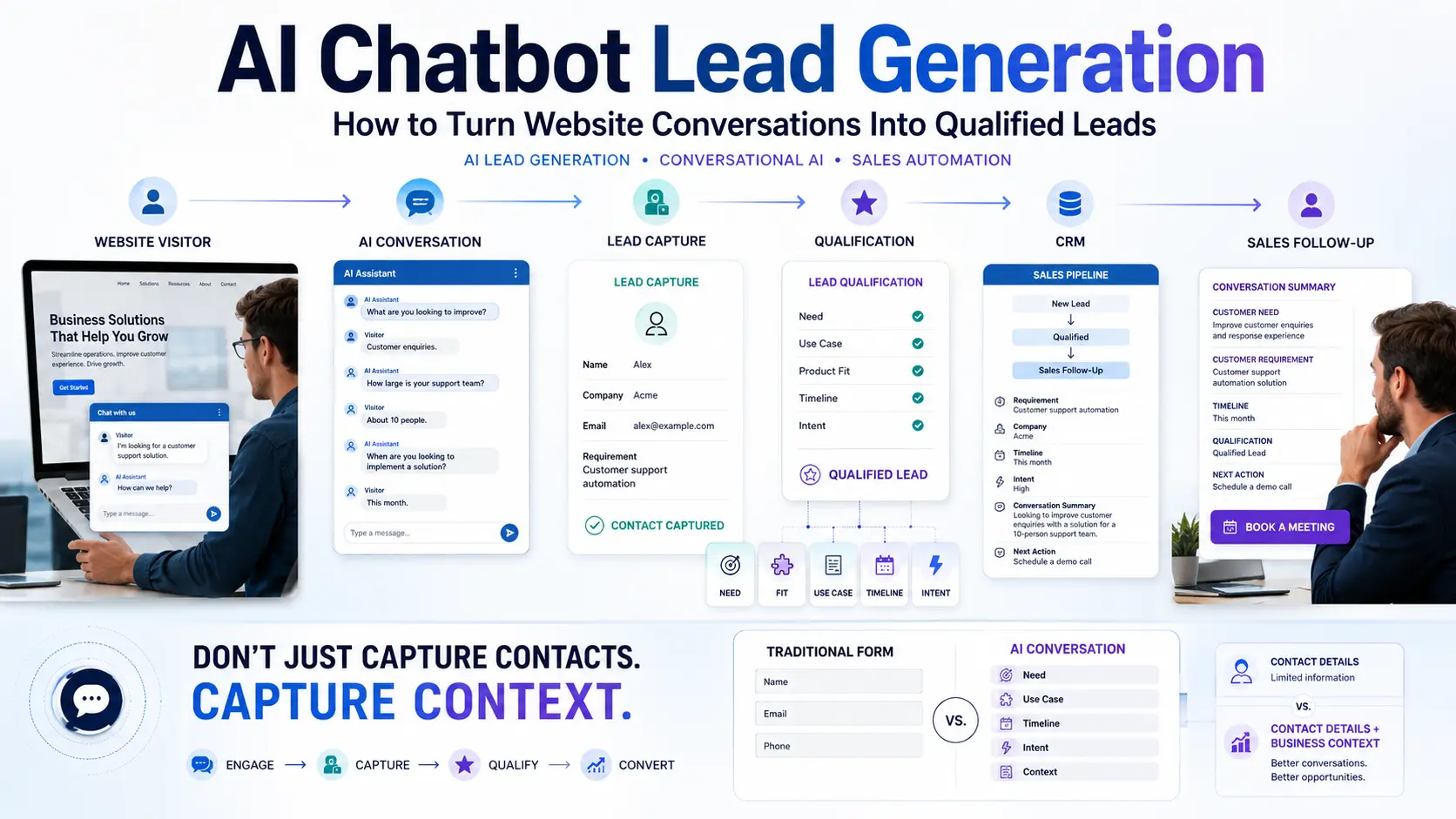
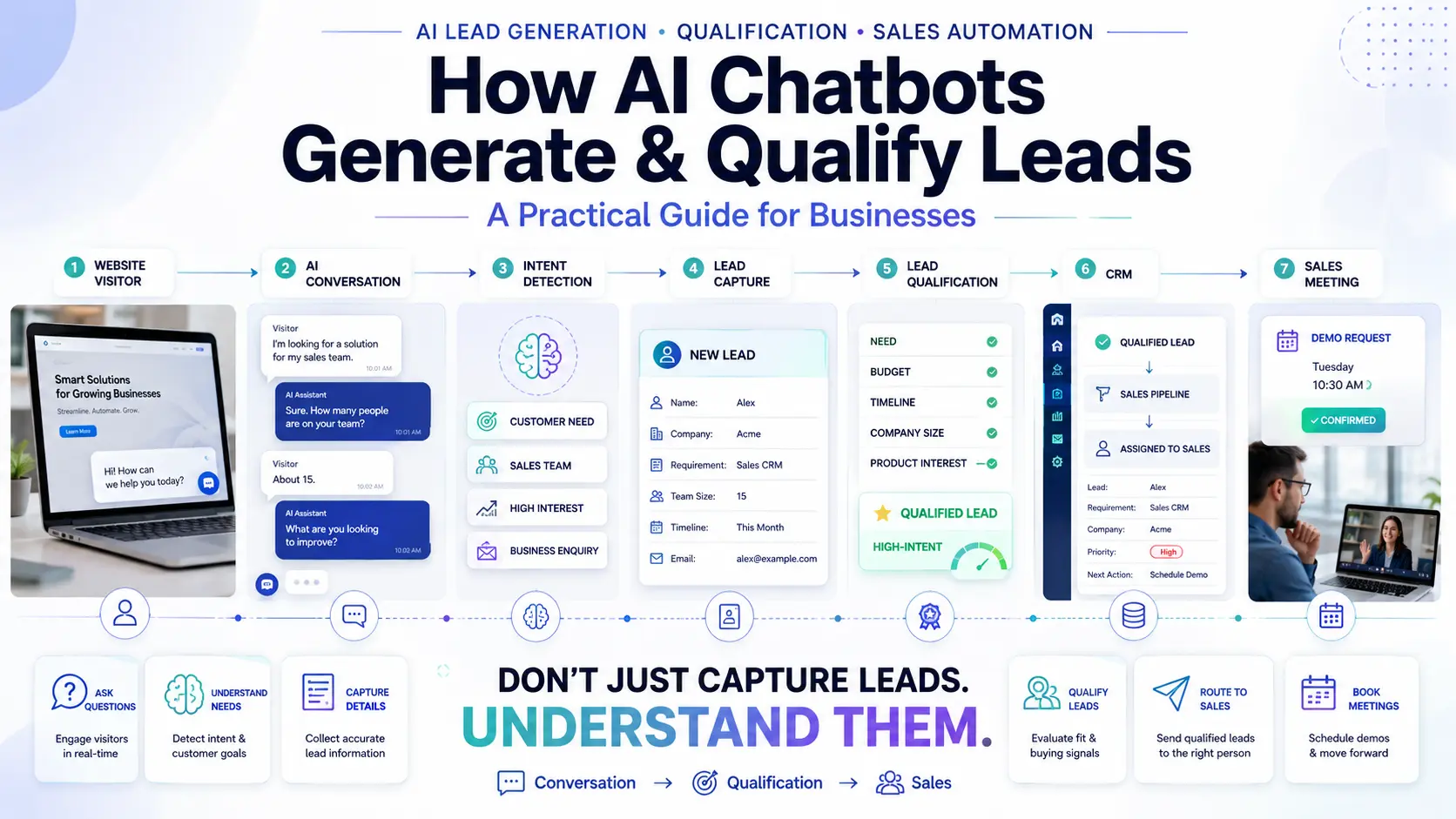
AI turns a passive website into an active lead-generation engine. Instead of a visitor browsing and leaving, the bot engages them.
Visitor: "Do you provide enterprise plans for large teams?"
AI Chatbot: "Yes, our enterprise plan supports unlimited users, custom API access, and a dedicated account manager. Would you like to speak with our enterprise team about your specific requirements?"
Visitor: "Yes, please."
The AI captures the intent, asks for the email, and routes the enquiry. For a deeper look at this workflow, see our guide on website chatbots for lead generation.
3. Automate Appointment Booking
Scheduling meetings manually often requires three to four emails just to find a time that works. A business chatbot eliminates this friction:
This workflow is highly effective for sales demos, healthcare appointments, property visits, and university admissions calls.
4. Automate Product & Service Recommendations
Users don't always know exactly what they are looking for. They have a problem or a requirement, and they need guidance.
- E-commerce: "I'm looking for a wedding outfit under ₹20,000." (AI suggests filtered catalog items).
- SaaS: "I need project management software for a 50-person marketing team." (AI recommends the Pro Plan and highlights relevant features).
- Travel: "We want a 5-day family trip to the mountains." (AI recommends specific family packages).
By pulling directly from your product database, the chatbot acts as a personalized digital concierge.
5. Automate Customer Support Requests
According to Zendesk, the volume of customer interactions is growing faster than support teams can handle. AI is critical for automating Tier 1 support.
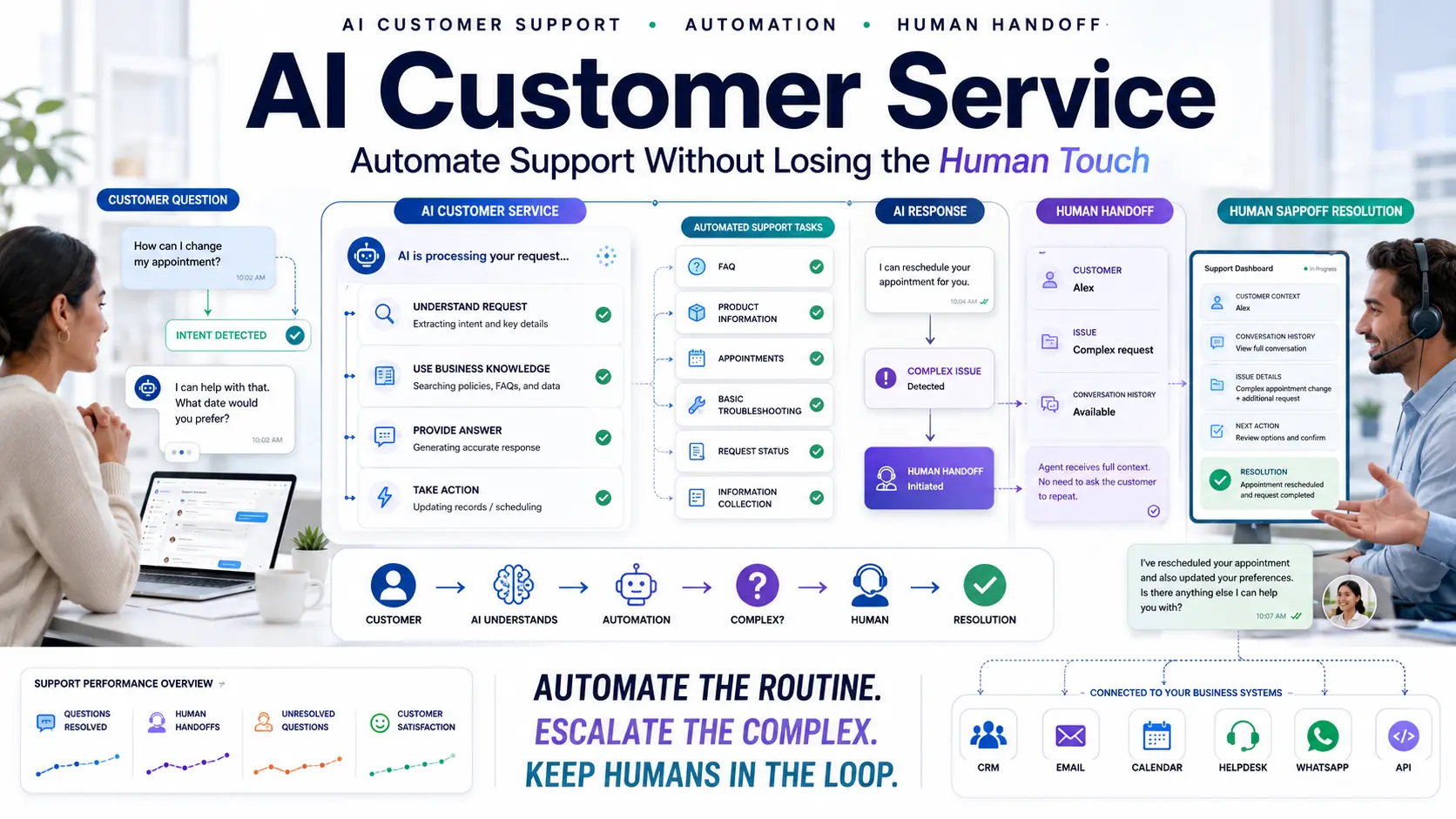
Instead of submitting a ticket for a password reset, a refund policy check, or a shipping status, the customer gets their answer instantly. We cover this extensively in our guide to AI customer support.
6. Automate Information Collection
Traditional lead forms are intimidating. A conversational UI is far more natural. Chatbots can collect structured information seamlessly as part of a dialogue.
Instead of a 10-field form, the chatbot asks for data step-by-step: Name, Email, Company, Requirement, Budget, and Timeline. Because the user is receiving value (answers) during the conversation, they are significantly more likely to provide their information.
7. Connect Conversations to CRM
The value of automation drops drastically if your sales team has to manually copy-paste chat logs from an inbox into your CRM.
A proper business chatbot workflow connects directly to your systems. When a conversation concludes and a lead is captured, the data flows automatically:
Visitor → AI Chatbot → Conversation Data → CRM → Sales Team → Follow-up
Using a dedicated Pre-Sales CRM ensures that your sales team has total visibility into the lead's intent and chat history before they make their first call.
8. Automate Human Handoffs
Good AI automation does NOT mean eliminating humans. It means protecting human time for the interactions that matter.
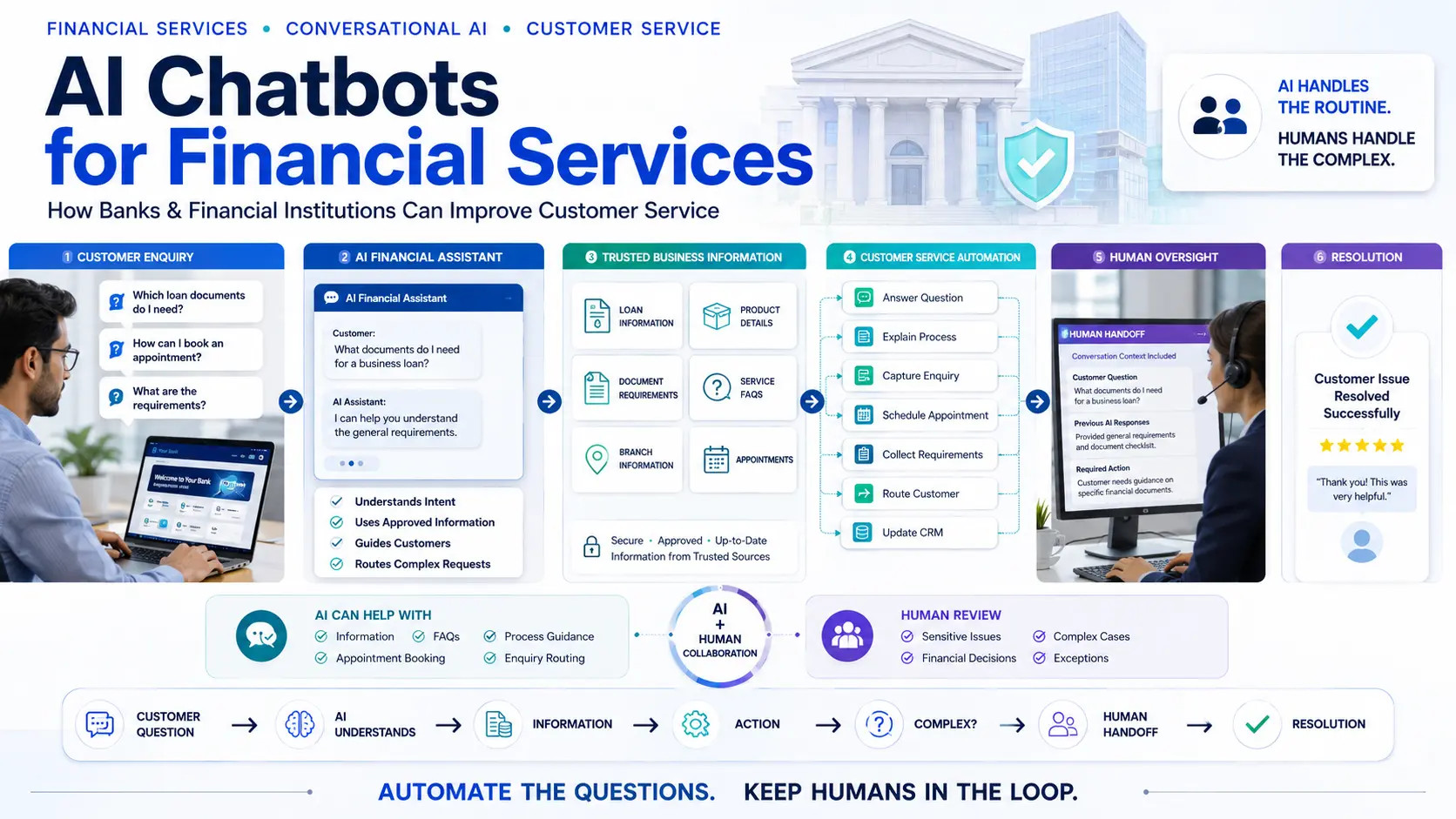
When a chatbot detects a highly complex issue, a VIP customer, or an angry user, it should seamlessly trigger a human handoff. The live agent receives the full transcript and context, allowing them to step in without making the customer repeat themselves.
9. Automate Internal Business Knowledge
AI chatbots aren't just for external websites. Many businesses use them internally. By training an AI on internal company wikis, HR policies, and technical documentation, employees can retrieve information instantly without interrupting colleagues.
ChatGPT vs Business AI Chatbots: What's the Difference?
A frequent question is: "Why do I need a business chatbot when ChatGPT exists?"
The difference comes down to control, deployment, and business workflows. ChatGPT is an incredible general-purpose tool. A business AI chatbot is a specialized agent acting on behalf of your brand.
| Feature | General-Purpose AI (e.g. ChatGPT) | Business AI Chatbot |
|---|---|---|
| General Knowledge | ✓ Yes | Depends on configuration |
| Proprietary Business Knowledge | Limited / Requires custom setup | ✓ Core focus |
| Website Integration | No native widget | ✓ Out of the box |
| Lead Capture | Not designed for it | ✓ Built-in capability |
| CRM Integration | Requires complex API builds | ✓ Standard integration |
| Appointment Booking | Requires custom logic | ✓ Supported |
| Human Handoff | ✗ No | ✓ Essential feature |
| Brand-Specific Responses | Requires continuous prompting | ✓ Pre-configured |
AI Chatbot vs Traditional Business Automation
For years, businesses have used static forms, rigid email sequences, and rule-based bots (click "1" for Sales, "2" for Support). AI conversational workflows fundamentally change this by allowing the user to dictate their journey using natural language, dynamically skipping steps and arriving at the correct business outcome much faster.
Which Business Processes Should You Automate First?
To avoid being overwhelmed, prioritize processes using this framework:
- Repetitive: Are your agents answering the same question 50 times a day?
- High Volume: Does it take up a significant percentage of team bandwidth?
- Easy to Define: Is the answer factual and clearly documented?
- Based on Existing Information: Is it already on your website or in a PDF?
Start by automating basic FAQs and simple lead capture. Once successful, move on to complex recommendations and appointment booking.
How to Implement an AI Chatbot for Your Business
Follow these steps to ensure a smooth deployment:
- Identify tasks: Decide exactly what the AI should (and should not) perform.
- Collect business information: Gather the URLs, PDFs, and text snippets the AI needs.
- Build the knowledge base: Upload this data to your chosen AI platform.
- Define conversation flows: Outline how leads should be qualified.
- Configure lead capture: Decide when and how to ask for contact details.
- Connect systems: Link your lead management system and calendars.
- Configure human handoff: Setup routing rules for your live agents.
- Test thoroughly: Simulate various customer journeys before launch.
- Monitor and improve: Review conversation logs weekly to fill knowledge gaps.
Common AI Chatbot Mistakes Businesses Make
- Automating everything immediately: Trying to build a bot that does everything at once usually results in a poor user experience. Start small.
- No human escalation: Never trap a frustrated customer in an endless AI loop. Always provide a way to speak to a human.
- No CRM integration: Treating the chatbot as an isolated widget rather than a connected data source creates data silos.
- Ignoring conversation analytics: The chatbot's logs are a goldmine of customer feedback; review them to see what products or features users are actually asking for.
How Quillive Helps Businesses Automate Customer Conversations
Quillive is designed specifically as an AI Website Assistant for modern businesses. It bridges the gap between conversational AI and business utility.
Instead of requiring complex coding, Quillive allows businesses to upload their data, configure their lead capture rules, and instantly deploy an assistant that can:
- Accurately answer website questions
- Engage passive visitors
- Qualify conversations based on your custom criteria
- Book appointments directly onto your calendar
- Seamlessly hand conversations over to human agents
- Connect customer data directly to business workflows
Industry Automation Examples
The same technology is applied differently depending on the business model:
- Real Estate: Automates property enquiries, captures budget/location preferences, and books site visits.
- Education: Automates admissions FAQs, retrieves course eligibility, and schedules counselor calls.
- Healthcare: Provides clinic hours, details on specialized services, and triages appointment requests.
- SaaS: Answers feature queries, qualifies use-cases, and routes enterprise leads to sales.
- E-commerce: Recommends products, checks order status, and handles basic return requests.
- Financial Services: Explains loan criteria, provides service information, and books advisor consultations.
Frequently Asked Questions
What is an AI chatbot for business?
An intelligent digital assistant designed to automate customer interactions and execute business workflows on a company’s website or app.
What can an AI chatbot automate?
It can automate answering FAQs, capturing lead information, booking appointments, recommending products, and pushing data directly into a CRM.
How do businesses use AI chatbots?
Businesses deploy them to provide instant 24/7 responses, reduce support tickets, and proactively engage website visitors to generate leads.
Can AI chatbots generate leads?
Yes. By replacing static forms with conversational dialogues, they often increase conversion rates by providing immediate value before asking for contact info.
Can AI chatbots book appointments?
Absolutely. They can integrate with calendars (like Google or Outlook) to let users book consultations or demos natively in the chat.
Can AI chatbots connect to CRM?
Yes, proper business chatbots feature integrations with systems like QuillCRM or Salesforce to log lead data automatically.
Can AI chatbots replace customer service?
No. They augment customer service by handling the repetitive 80% of queries, leaving human agents to handle the nuanced 20%.
What is the difference between ChatGPT and a business chatbot?
ChatGPT is a general tool. A business chatbot is securely grounded in your specific company data and engineered to drive your specific business outcomes.
Are AI chatbots useful for small businesses?
Yes, they act as an affordable, 24/7 digital employee, allowing small teams to punch above their weight in customer service.
How much does a business AI chatbot cost?
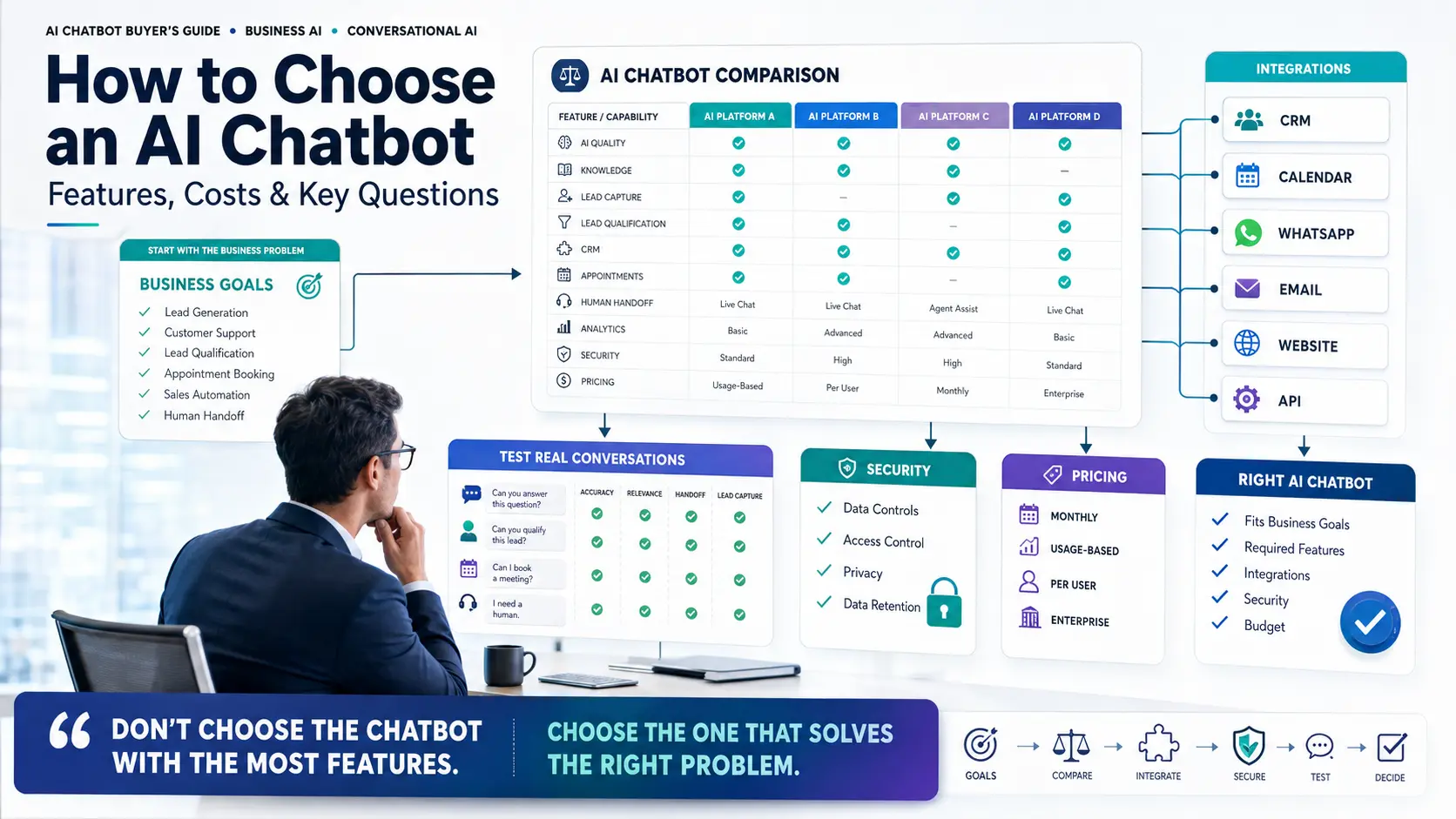
Prices vary based on message volume and enterprise features, ranging from inexpensive self-serve plans to custom enterprise solutions.
What businesses benefit from AI chatbots?
Any business with high traffic, repetitive questions, or a strong need for lead qualification benefits significantly.
Can AI chatbots handle complex questions?
If the information is in their knowledge base, yes. If not, they are programmed to intelligently escalate to a human.
Do I need coding skills to build one?
Not anymore. Platforms like Quillive offer no-code interfaces where you simply upload documents or website links to train the AI.
Is the data secure?
Enterprise-grade chatbots ensure that your proprietary business data is siloed and not used to train public LLM models.
How do I measure success?
Look at lead volume, conversion rate, appointment bookings, and the reduction in repetitive tickets handled by your human team.
What happens if the AI doesn't know the answer?
You can configure fallback behaviors, such as saying "I don't have that information, let me connect you to our team," rather than guessing.
Can it handle multiple conversations at once?
Yes, AI can handle thousands of simultaneous conversations without any delay in response time.
Does it work on mobile?
Yes, modern chat widgets are fully responsive and optimized for mobile browser experiences.
How often should I update the knowledge base?
Whenever your business changes pricing, policies, or products, the AI's knowledge base should be updated immediately.
Will a chatbot annoy my visitors?
Only if designed poorly. A helpful, unobtrusive assistant that provides real answers is highly valued by modern consumers.
Conclusion
AI chatbots for business are most valuable when they are securely connected to real business processes. The primary goal is not simply to "put an AI on the website for the sake of having AI."
The goal is to identify your most repetitive, high-volume conversations and automate the correct parts of them. By following a structured workflow—understanding the question, providing the answer, qualifying the user, acting on their intent, connecting the data to your CRM, and handing off to a human when necessary—you transform a basic chat widget into a powerful operational asset.
For organizations ready to modernize their customer engagement and automate repetitive workflows, platforms like Quillive provide the intelligence and integration needed to build a smarter, more efficient business.

Quillnext Team
The Quillnext Team builds advanced conversational AI solutions that help businesses automate customer support, capture leads, and scale operations efficiently.
Visit Quillnext