Quick Answer: How does a Website Chatbot generate leads?
A website chatbot for lead generation turns passive traffic into qualified leads by actively starting conversations and answering visitors' questions instantly. Once a visitor engages, the chatbot identifies their buying intent, asks strategic questions to qualify their budget and timeline, and seamlessly captures their contact information. It can even book appointments and send high-intent prospects directly into a CRM for the sales team—automating the entire conversion journey.
Introduction
Businesses spend significant budgets on Google Ads, SEO, and social media campaigns to drive traffic to their websites. Yet, an overwhelming majority of that traffic—often upward of 97%—leaves without ever contacting the company.
Why? In many cases, visitors have specific questions they cannot easily find answers to. They might be in the research phase and are not ready to fill out a rigid, 10-field contact form. Or, they might need immediate clarification before they are willing to speak with a sales representative, and nobody is available to respond at 11:00 PM.
When the next step is unclear, friction causes abandonment. By deploying a lead generation chatbot, businesses can turn their static website into an interactive experience, converting passive readers into active conversations, and ultimately, into sales-ready leads.
Why Website Visitors Don't Always Become Leads
There is a massive conversion gap between generating traffic and acquiring a qualified lead. Understanding why visitors abandon your site is the first step in fixing the funnel.
- Contact-Form Friction: Modern consumers view long forms as a barrier. According to HubSpot, buyer expectations have shifted toward real-time engagement. They know filling out a form means waiting 24 hours for a response and potentially getting spammed.
- Lack of Immediate Answers: If a buyer cannot immediately confirm whether your SaaS product integrates with their current tech stack, they will leave and check your competitor.
- Poor Navigation & Unclear CTAs: If the "Book a Demo" button is buried at the bottom of a 3,000-word page, the visitor won't find it.
- Competitor Comparison: Buyers open five tabs at once. The company that engages them first usually wins the deal.
What Is a Website Chatbot for Lead Generation?
Specifically in the context of business websites, a website chatbot is an intelligent virtual assistant that sits on your web pages, usually in the bottom corner.
Unlike a basic support bot that just links to help articles, a lead generation chatbot is engineered to combine customer support, conversational lead qualification, and appointment booking into a single fluid interaction. Its primary goal is to guide the user toward a conversion event.
How a Website Chatbot Turns a Visitor into a Lead
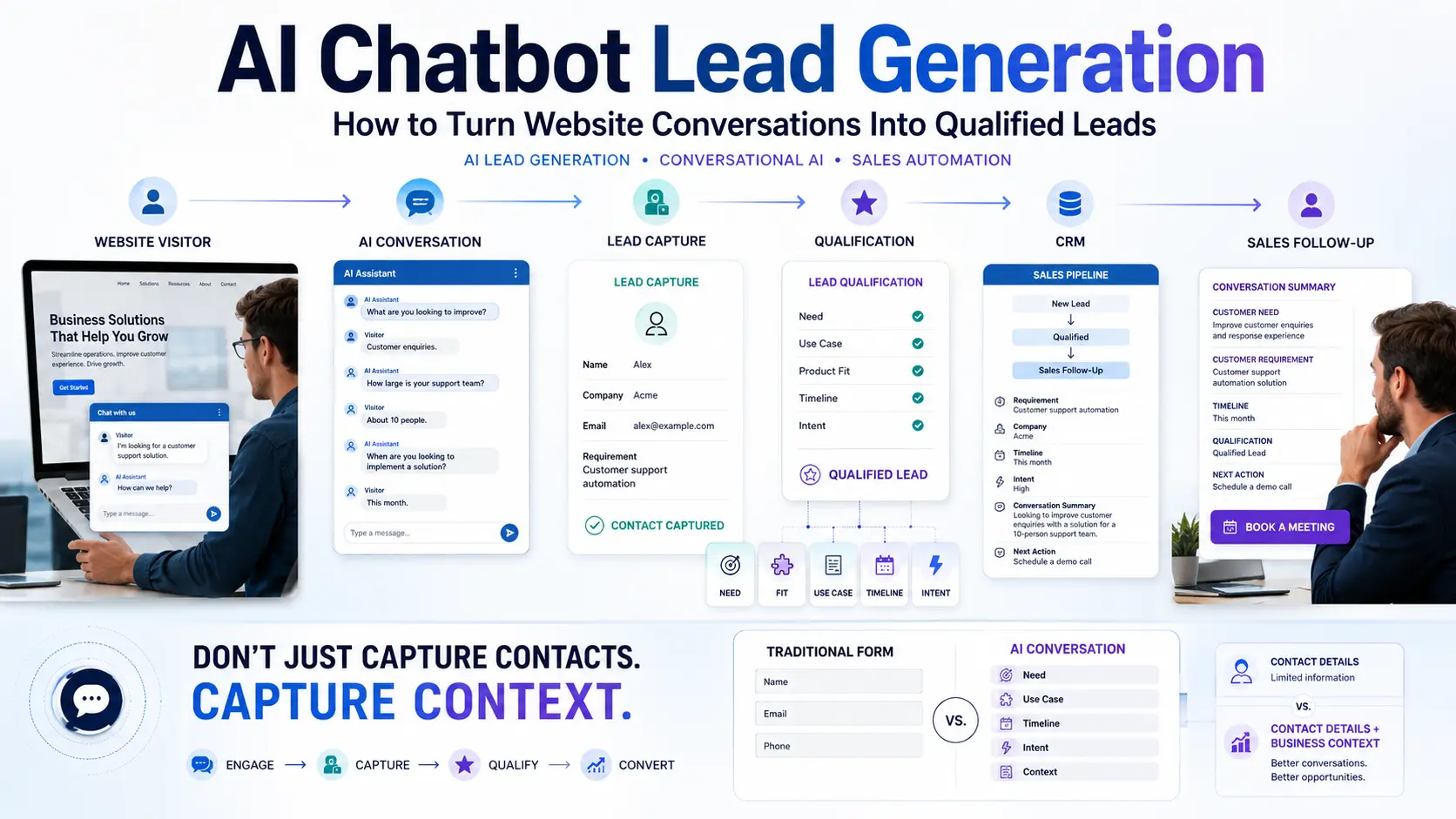
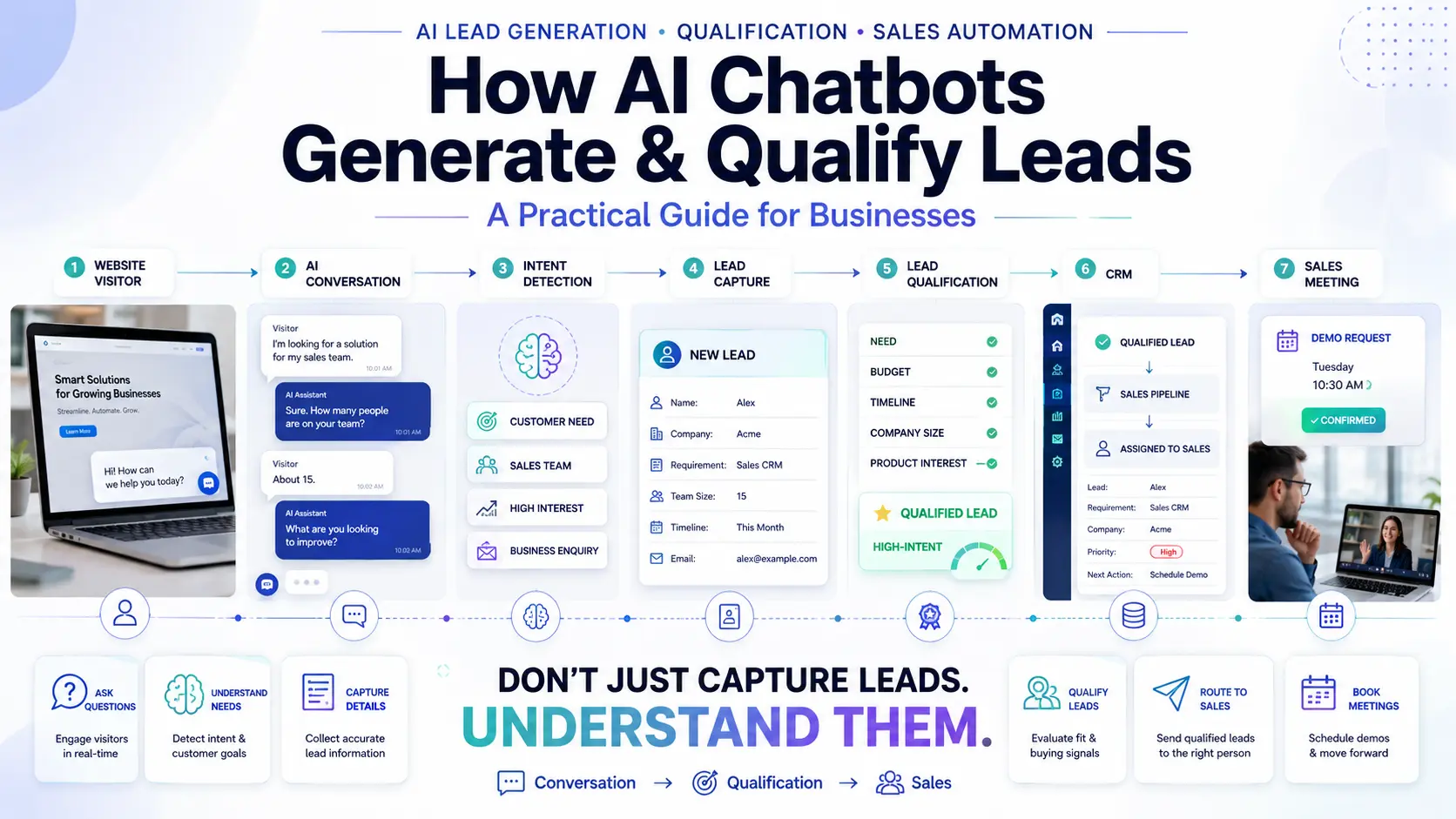
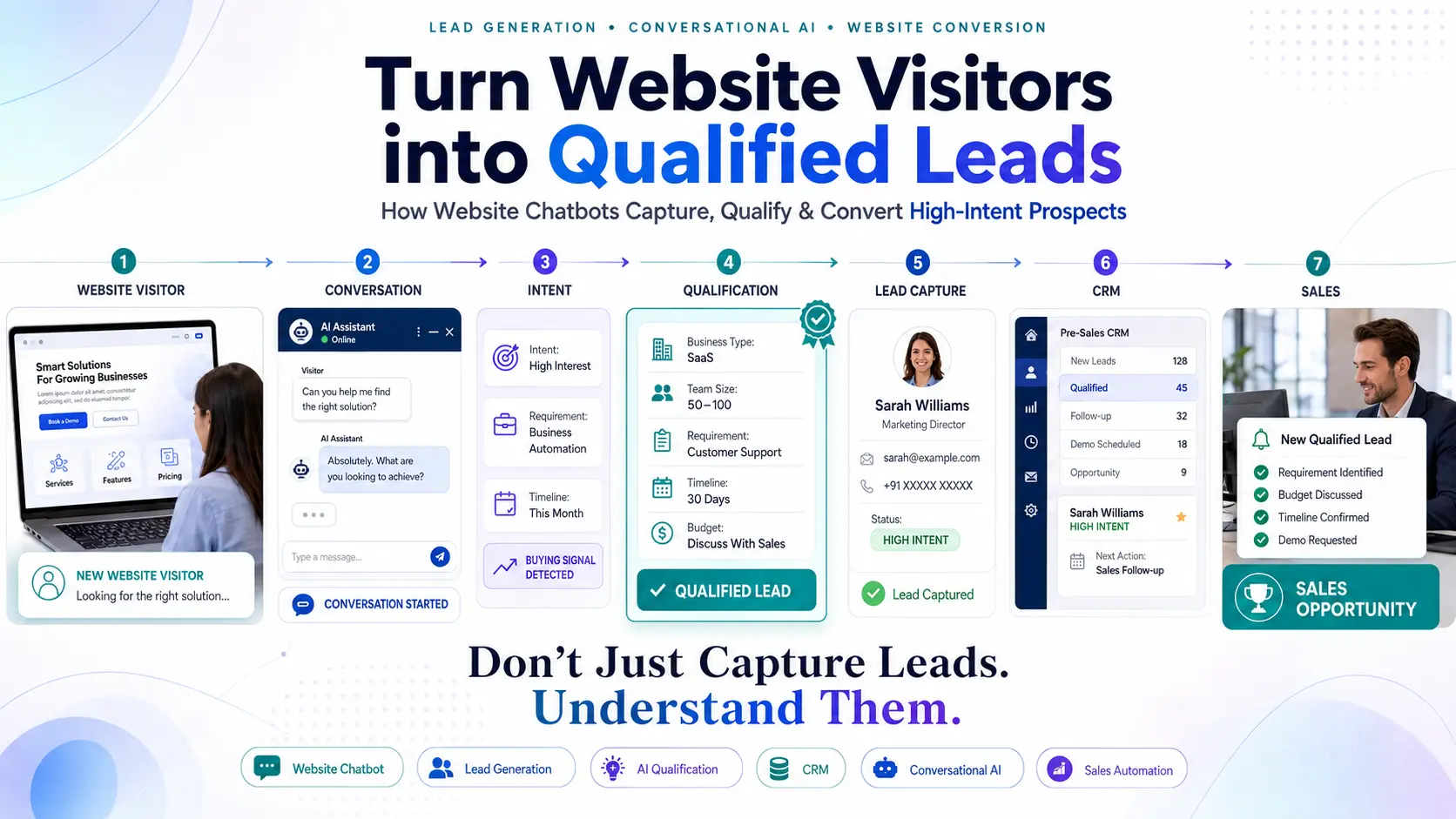
Let's break down the exact journey of how an anonymous visitor becomes a qualified opportunity in your sales pipeline.
The Complete Conversion Journey
Stage 1: Visitor Arrives
Whether they clicked a Google Ad, a social media post, or found you organically, the visitor lands on your page with a specific problem to solve.
Stage 2: Chatbot Starts the Conversation
Instead of waiting for the user to hunt for a contact page, the chatbot proactively opens with a contextual message based on the page they are viewing. For example, on a pricing page: "Hi! Trying to figure out which tier fits your team size? I can help."
Stage 3: Visitor Asks a Question
The visitor asks, "Do you integrate with Shopify?" The AI instantly searches its knowledge base and replies, "Yes, we have a native Shopify integration that takes 5 minutes to set up." Providing value first is critical.
Stage 4: Intent Is Identified
Because the visitor asked about an integration, the AI identifies their intent as "Evaluating/Buying" rather than "Support/Troubleshooting".
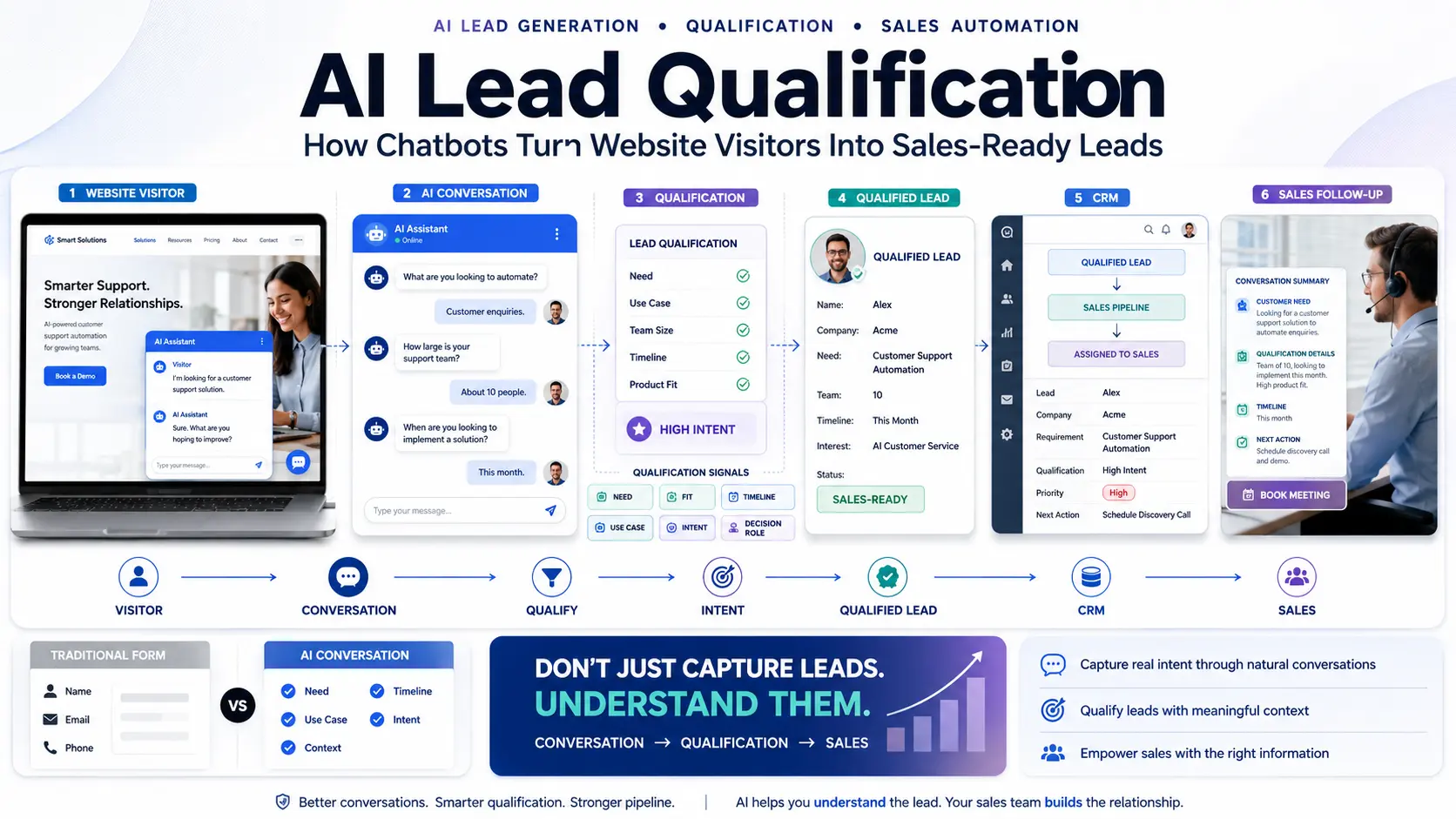
Stage 5: Chatbot Qualifies the Visitor
The chatbot seamlessly transitions into qualification: "To make sure our platform is a fit, roughly how many monthly orders does your Shopify store process?"
Stage 6: Contact Information Is Captured
Once qualified, the chatbot asks for details: "It looks like our Pro Plan is perfect for you. What is your business email so I can send over the integration guide and pricing details?"
Stage 7: Lead Is Classified & Sent to Sales
The visitor provides their email. The chatbot categorizes them as a "High Intent Lead" and securely pushes this data directly into the CRM, notifying a sales representative to follow up immediately.
How Chatbots Identify Visitor Intent
Not all visitors are equal. A smart AI chatbot for business uses Natural Language Processing to detect buying signals based on the terminology the visitor uses.
- "I need pricing for 50 users." → High Commercial Intent. Route to Sales immediately.
- "Can someone give me a demo?" → High Commercial Intent. Trigger appointment booking flow.
- "We are evaluating three vendors." → High Intent. Requires a human closer to handle objections.
- "How do I reset my password?" → Support Intent. Provide the answer and close the ticket without involving sales.
How Chatbots Qualify Leads
Sending unqualified leads to your sales team wastes their time. Your chatbot acts as a digital SDR (Sales Development Representative) by asking practical qualification questions tailored to your industry.
B2B / SaaS
- Company size / Number of users?
- What is your primary use case?
- When do you plan to implement this?
- Are you the primary decision-maker?
Real Estate
- Are you looking for commercial or residential?
- What is your preferred location?
- What is your budget range?
- When are you looking to move?
Education
- Which course are you interested in?
- Are you looking for the Fall or Spring intake?
- What is your highest qualification?
Healthcare
- Are you a new or returning patient?
- Which specialized service do you require?
- What is your preferred appointment time?
When Should a Chatbot Ask for Contact Information?
Timing is everything in conversational lead generation. The biggest mistake businesses make is demanding information too early.
The BAD Approach (Friction)
Chatbot: "Hi! Give us your name, phone number, email and company before we can help you."
Result: 80% of users immediately close the chat window because they haven't received any value yet.
The BETTER Approach (Value First)
Visitor: "Do you offer bulk discounts?"
Chatbot: "Yes, we offer up to 20% off for orders over 50 units. Roughly how many units do you need?"
Visitor: "Around 100."
Chatbot: "Great! I can have our sales manager send you a custom quote for 100 units. What's your business email?"
Result: High conversion rate because trust and relevance were established first.
Core Principle: VALUE → TRUST → QUALIFICATION → CONTACT
Website Chatbot vs Contact Forms
While traditional forms still serve a purpose (such as complex vendor registrations), chatbots vastly outperform them in capturing high-velocity sales leads.
| Feature | Contact Forms | AI Chatbots |
|---|---|---|
| User Interaction | Static, one-way submission. | Dynamic, two-way conversation. |
| Response Time | Usually 12–24 hours. | Instant. |
| Lead Qualification | Rigid drop-down menus. | Adaptive, conversational probing. |
| Conversion Friction | High (Intimidating form walls). | Low (Natural chatting experience). |
| Appointment Booking | Requires separate email follow-up. | Booked instantly in the widget. |
Website Chatbot vs Live Chat
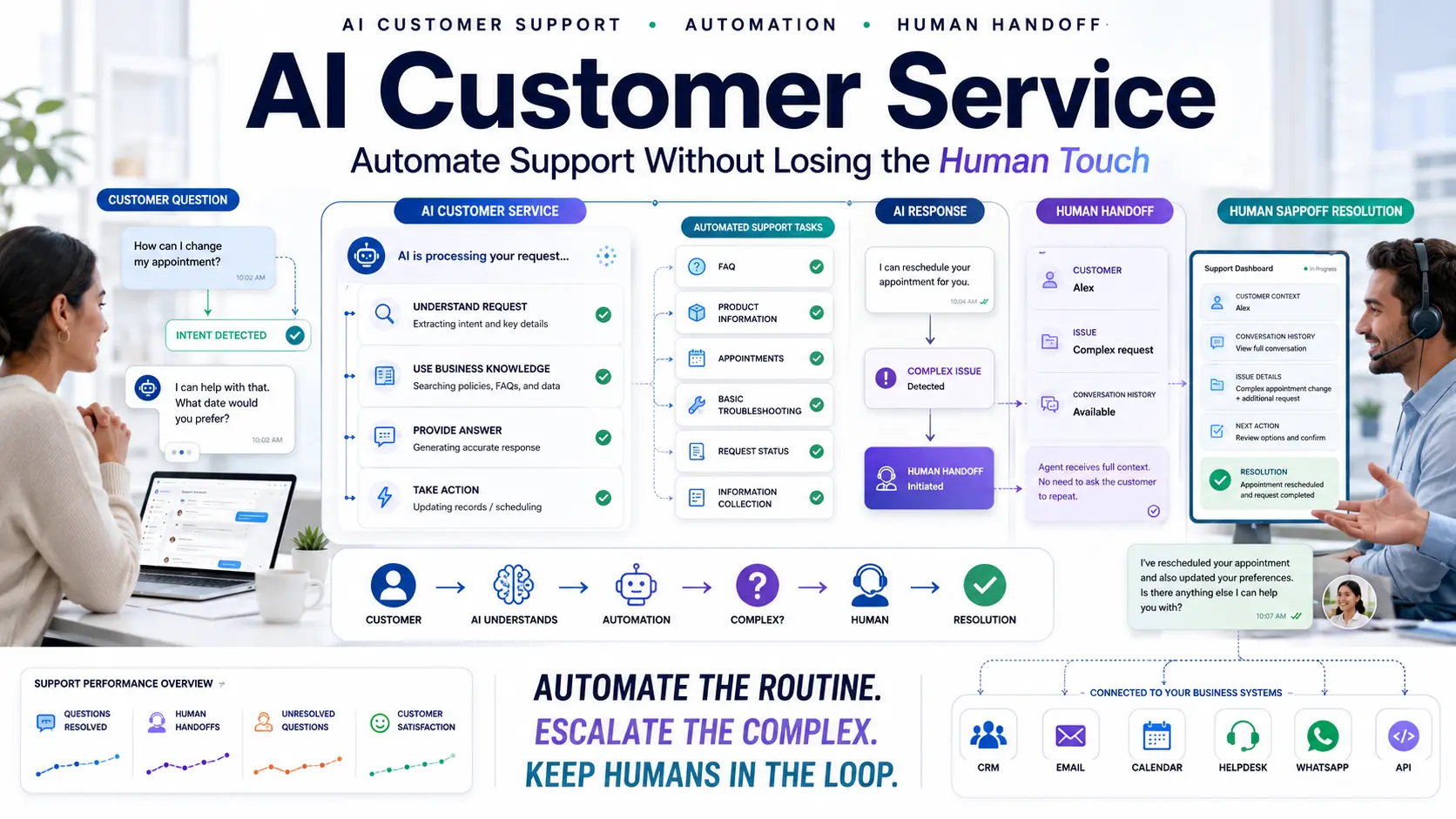
Live chat relies on humans sitting behind a screen waiting for messages. As Salesforce reports, support volume is constantly increasing, making human-only chat unscalable. The best approach for modern businesses is a hybrid model: AI first, Human when necessary.
- AI Chatbot: Handles the initial greeting, answers 80% of routine questions instantly (24/7), identifies intent, and captures the lead's contact information.
- Human Live Chat: Steps in only when the AI detects a highly complex question, an angry customer, or a very high-value VIP lead that requires a senior closer.
How Chatbots Book Appointments and Demos
A chatbot for booking appointments removes the endless back-and-forth emails ("Are you free Tuesday at 2?").
The workflow is simple:
- Visitor expresses interest ("I'd like to see a demo").
- Chatbot identifies intent and verifies basic qualification.
- Chatbot checks the sales team's real-time calendar availability.
- Chatbot presents a calendar selector directly in the chat window.
- Visitor selects a time slot and provides their email.
- The appointment is confirmed, and a calendar invite is sent to both parties instantly.
What Happens After a Chatbot Captures a Lead?
Capturing the lead on the website is pointless if the data disappears into a disorganized email inbox. Integration with a CRM is mandatory.
Once the chatbot qualifies the visitor and captures their email, it pushes that data—along with the entire chat transcript—into a Pre-Sales CRM. This ensures your sales team has the full context of the conversation before they ever pick up the phone, allowing them to tailor their pitch perfectly.
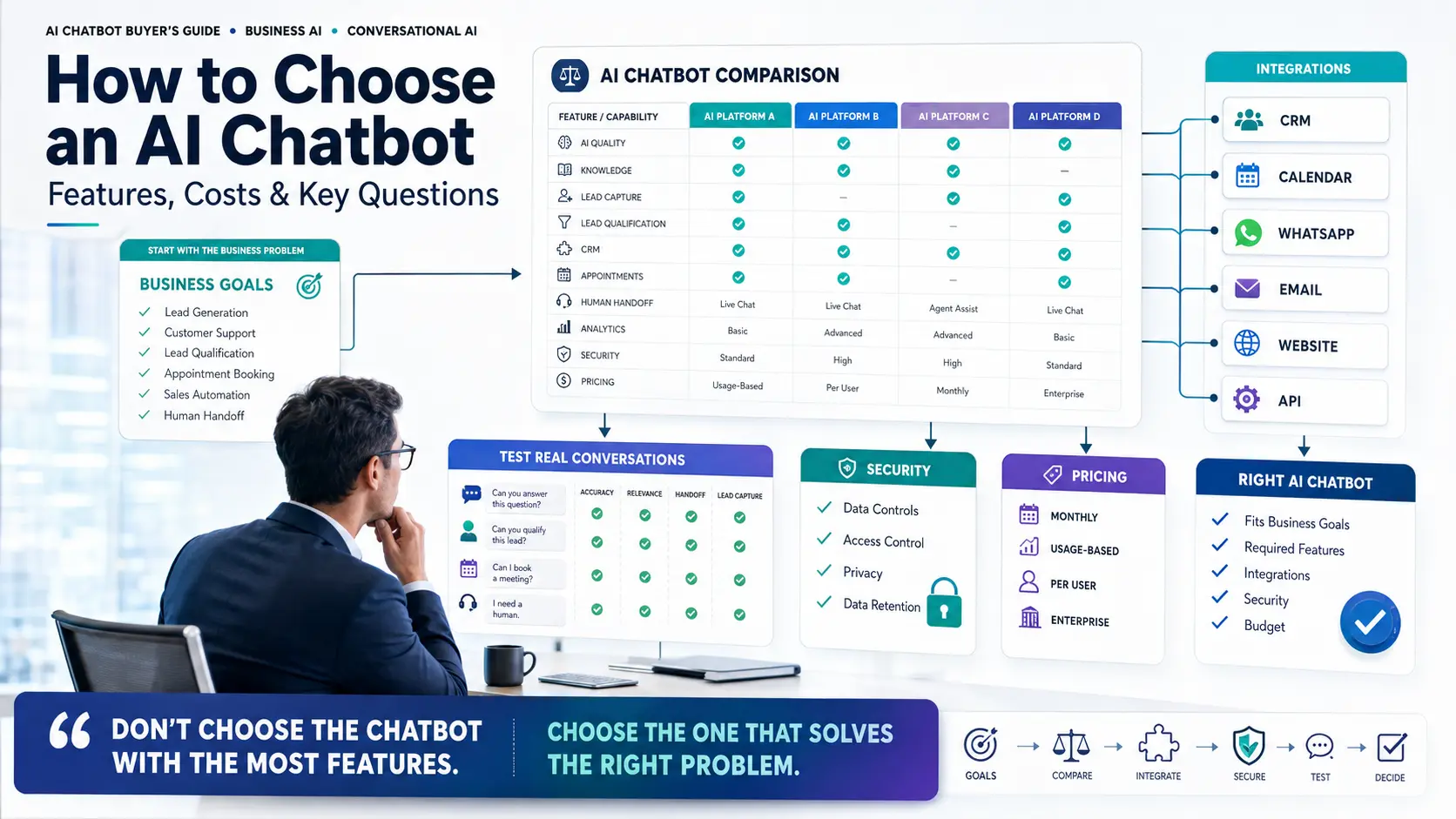
How to Build a High-Converting Website Chatbot
Follow this framework to implement a successful lead generation chatbot strategy:
- Define the Business Goal: Are you trying to book demos, collect emails for a newsletter, or qualify real estate buyers?
- Build the Knowledge Base: Feed the AI your website content and PDFs so it can actually answer questions intelligently.
- Define Qualification Criteria: What 3 questions does your sales team *need* answered before they speak to a lead?
- Decide When to Capture Details: Program the bot to offer value first, then ask for the email.
- Connect CRM: Integrate with your CRM for qualified leads.
- Configure Human Handoff: Set up routing rules so your team is notified when a high-intent buyer is live on the site.
Website Chatbot Lead Generation Metrics to Track
According to Gartner, data-driven automation yields the best results. To measure success, monitor these key metrics:
- Engagement Rate: The percentage of website visitors who interact with the chatbot.
- Conversation Completion Rate: How many users finish the chat flow without dropping off.
- Leads Captured: Total number of emails/phone numbers collected.
- Lead Qualification Rate: The percentage of captured leads that meet your sales criteria.
- Human Handoffs: How often the AI needed to escalate the chat to a human agent.
Common Website Chatbot Mistakes
Mistake: Asking for phone numbers immediately.
Fix: Provide an answer first to build trust, then gently request an email address.
Mistake: Poor Knowledge Base.
Fix: Ensure the AI is trained on your most recent pricing and policies so it doesn't give incorrect answers.
Mistake: No CRM Integration.
Fix: Automatically push every qualified lead into a lead management system to prevent them from getting lost in a spreadsheet.
Mistake: No Human Handoff.
Fix: Always give the user an escape hatch ("Would you like to speak to a human?") if the AI cannot resolve their specific nuance.
How Quillive Helps Turn Website Visitors into Qualified Leads
Turning passive traffic into a predictable pipeline of qualified prospects requires the right technology. Quillive is built as an AI Website Assistant specifically to bridge the gap between visitor and customer.
With Quillive, businesses can deploy an intelligent agent that:
- Instantly answers questions using your business data.
- Detects buying intent from user language.
- Automatically asks your custom qualification questions.
- Captures contact details natively within the chat.
- Books appointments directly into your sales team's calendar.
- Connects seamlessly to sales workflows and CRM systems.
By automating the heavy lifting of lead capture and qualification, Quillive ensures your sales team only spends their time talking to prospects who are ready to buy.
Frequently Asked Questions
How do website chatbots generate leads?
They generate leads by proactively engaging visitors, answering their queries to build trust, and then requesting contact information to facilitate the next step.
How do chatbots qualify leads?
By asking a series of targeted questions (e.g., company size, budget, timeline) to ensure the prospect meets your business's ideal customer profile.
Can a chatbot capture contact information?
Yes, chatbots can seamlessly collect names, emails, and phone numbers natively within the chat window.
Can AI chatbots replace contact forms?
In many modern funnels, yes. Chatbots offer a conversational experience that typically converts at a higher rate than static web forms.
Can website chatbots book appointments?
Yes, by integrating with calendar tools, a chatbot can display available times and confirm meetings directly with the user.
What is a lead generation chatbot?
An AI assistant whose primary objective is to capture and qualify potential buyers on a website, rather than just providing customer support.
What is conversational lead generation?
The strategy of using real-time dialogue (chat) to engage, qualify, and convert prospects, removing the friction of traditional marketing.
How does AI identify buying intent?
By analyzing the context and semantics of the visitor's questions. A query about "enterprise pricing" signals higher intent than a query about "login issues."
Can a chatbot send leads to a CRM?
Yes. Proper setup ensures all lead data and chat transcripts are automatically pushed to your CRM for sales follow-up.
What questions should a lead generation chatbot ask?
It depends on your industry, but generally: What is your goal? What is your budget? When do you need this solution?
Are AI chatbots useful for small businesses?
Extremely. They act as a 24/7 digital sales rep, capturing leads while the business owner is asleep or busy.
How much does a website chatbot cost?
Prices range from inexpensive basic widgets to comprehensive enterprise AI solutions; the ROI usually covers the cost rapidly via increased lead volume.
How is this different from a support chatbot?
Support bots aim to close tickets and deflect issues. Lead gen bots aim to prolong engagement, qualify intent, and capture data for sales.
What if the user gives a fake email?
Advanced systems can verify email syntax in real-time or use OTPs (One Time Passwords) to ensure data accuracy before pushing to the CRM.
Will the chatbot interrupt my sales team?
No, you configure routing rules so the sales team is only notified when a prospect meets all qualification criteria.
Should the chatbot pop up immediately?
Usually, it is better to set a delay (e.g., 10 seconds) or trigger the popup based on scroll depth so the visitor has time to read the page.
Can the chatbot speak multiple languages?
Yes, modern AI language models can seamlessly detect and converse in dozens of languages.
Does the chatbot slow down the website?
No, well-built chatbot widgets load asynchronously and do not impact core web vital scores.
Can a chatbot qualify job applicants?
Yes, while primarily for sales leads, the exact same qualification logic can be applied to screen and capture recruitment candidates.
What is a human handoff?
The process where the AI pauses its automated responses and seamlessly connects the visitor to a live human agent.
Conclusion
Generating traffic to your website is only the first step in the marketing funnel. The real opportunity—and where most businesses lose revenue—is what happens after those visitors arrive.
By implementing a website chatbot for lead generation, you ensure that every visitor is greeted, their questions are answered instantly, and their buying intent is captured. A well-designed conversational flow takes an anonymous visitor on a guided journey: from conversation, to understanding, to qualification, to contact capture, and finally into a robust sales opportunity.
Businesses must shift focus from simply buying more traffic to creating frictionless conversion experiences for the traffic they already have. Explore how Quillive can automate your entire website lead generation process and transform your digital presence into a 24/7 revenue engine.